

 Previous

Jan's Working with Windows 10:
Tablet Mode
Windows 10 can use tablet mode for small devices like smartphones and small tablets. It can be set to do that automatically or to just remember which mode you used last.
Tablet mode is supposed to make it easier to use your fingers instead of a mouse and physical keyboard. Your apps may not be ready for true mouseless work.
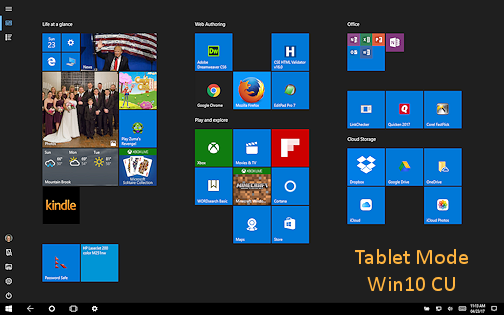
Switch to Tablet mode:
If you want to use Tablet mode when Windows 10 does not automatically switch -
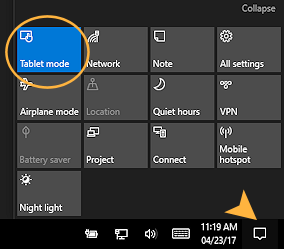 Click the Action Center icon,
  or
or  in the Notification area.
The Action Center pane appears at the right of the screen. Some toggle buttons for features appear just above the Taskbar.- Click on the Tablet mode button.
The interface changes to Tablet mode. - Repeat to toggle Tablet mode off.
The interface goes back to Desktop mode.
You may not notice a difference immediately if you have a program open full screen.
What's different in Tablet mode from Desktop mode:
- Initial screen: Shows the Start menu tiles, full screen.
- Full screen: All programs run full screen by default. You can have two windows which share the screen width. No other window sizes.
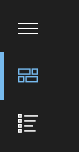 New icons at top left of the screen:
 Displays tiles for apps pinned to the Start menu.
 Displays the All Apps list of programs.
 New button: Back arrow on Taskbar. Takes you to the previous window. There is no button to reverse that process.
 Fewer Notification icons: By default, only the Windows 10 status icons show. You will likely see Power, Wireless or Network connection, Volume, Time and Date, and Action Center.
There is no arrow to show a palette of other notification icons.- Icon spacing is wider in the Notification area.
 Search: Search text box on the Taskbar is replaced with the Back arrow and Search icon, either the magnifying glass or the Cortana circle.
Manage the display of Taskbar and Notification icons:
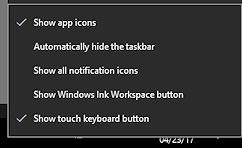 Right click on the Taskbar.
A context menu appears.- Click on an option to toggle it on or off.
The choice 'Show all notification icons' will show only the icons that show in Desktop mode. Any icons on the palette of notification icons will still be there.
|
|


| © 1997-2017 Jan Smith All Rights Reserved |
Site Map What's New |
Privacy Policy Terms of Service Copyright Acknowledgements |
~~ 1 Cor. 10:31 ...whatever you do, do it all for the glory of God. ~~
Last updated: April 23, 2017